
Frequently asked questions
Quickly find the answer you are looking for
Visits
I cannot found the fields for the phone number, the mail, ... where are they?
Service management allows to link a visit to an address book contact.
In this way you can avoid to insert data both in the app and in the address book.
From the details screen of the visit, press on the contact badge person to link the visit to a contact.
Once linked, it will be possible to access all contact data from Service management
In this way you can avoid to insert data both in the app and in the address book.
From the details screen of the visit, press on the contact badge person to link the visit to a contact.
Once linked, it will be possible to access all contact data from Service management
What do the colors mean?
The colors are used to categorize the visits. You could want to categorize them by interest level. Or by spoken language. Or by sex or age. Let's choose yourself ;)
How can I set the position of the visit (or of an house) in the map?
My advice is to always keep GPS active. Android devices uses GPS on only when an app request it.
If GPS is active, the visit (or the house) will automatically get the position from GPS.
If you want to set it manually, press on button location_on from the details of the visit (or the house). Here you could setup the position...:
If GPS is active, the visit (or the house) will automatically get the position from GPS.
If you want to set it manually, press on button location_on from the details of the visit (or the house). Here you could setup the position...:
- 1. Searching it with Google with the address
- 2. Inserting it manually in the map: press on desidered position and drag the marker
How can I handle the magazine routes?
First of all, you have to assign a specific color to the magazine routes. Then, from the list of the visits, open the statistics. On this screen you will see a dot near to the date you visited the call. It will be easy to identify the magazine routes you still have to do.
Territories
How can I mark absents?
Inserting the houses (and/or the condos) inside the territory. When you find an absent, remove the house by selecting it (tap and hold over it) and pressing on the bin
What is an "house group"?
An house group could be a street, a block, a fraction, ...
Depending on your territory (if rural or city) you will decide how to name it.
In a house group you can insert one or more houses or condos
Depending on your territory (if rural or city) you will decide how to name it.
In a house group you can insert one or more houses or condos
How can I handle a condo?
Watch the video-guide here:
How can I set the borders of the territory?
From the details screen of the territory, press the button pentagon
Watch the video-guide here:
Watch the video-guide here:
What is the QR scan for and how does it work?
Service management can import file in KML/KMZ format.
This format is meant to contains placemarks and/or geographical areas.
Pressing the qr_code_scanner button, the app will download the file linked to the QR.
Then it will try to import it.
So, with a single touch, you can import a territory with his boundaries!
If you wish to predispose the territories of your congregation, all you have to do is:
1. Create a KML/KMZ file for every territory
2. Upload them online (you can use Dropbox, Google Drive, or any other similar service)
3. Create a QR code which links directly to a file
This format is meant to contains placemarks and/or geographical areas.
Pressing the qr_code_scanner button, the app will download the file linked to the QR.
Then it will try to import it.
So, with a single touch, you can import a territory with his boundaries!
If you wish to predispose the territories of your congregation, all you have to do is:
1. Create a KML/KMZ file for every territory
2. Upload them online (you can use Dropbox, Google Drive, or any other similar service)
3. Create a QR code which links directly to a file
Reports
How can I send my monthly report?
Open the month you want to send and press the share button share
You will be prompted to select the app to use to send the report
You will be prompted to select the app to use to send the report
What are the "estimated hours"?
The estimated hours are the hours that you will do if you continue to go in service with that rhytm.
For example, if you are in the middle of the month and you have done 20 hours, the estimated hours will be 40.
This feature is useful to plan your service: knowing how are you going in the month, you can decide if you have to increment your service
For example, if you are in the middle of the month and you have done 20 hours, the estimated hours will be 40.
This feature is useful to plan your service: knowing how are you going in the month, you can decide if you have to increment your service
I'm a pioneer. How can I know how many hours I still have to do?
From the report list, click on show_chart and go to the goal chart. Setup the period you want (probably the theocratic year) and the hours you have to do. The pie chart will show you how much you did, and how much you have to do.
I work for the LDC or for the HLC. How can I separately mark the hours?
To enable this feature you have to open settings, and check "Enable 'theocratic projects' field".
Into the reports of the day will appear a new checkbox which will let you mark the spent hours for theocratic projects.
Into the reports of the day will appear a new checkbox which will let you mark the spent hours for theocratic projects.
How can I mark the number of studies or notes?
You can mark the number of studies by clicking on the month and entering the value in the appropriate field. On that screen you can also enter notes.
Presentations
How can I download lastest presentations?
Press the button download and select the desired language
There will be listed the latest presentations. Select the ones you want to import and press import button system_update_alt
There will be listed the latest presentations. Select the ones you want to import and press import button system_update_alt
What are the tags of the presentations?
Tags are categories that you can assign to the presentations to search them easier. For example you could use these tags: "family", "last days", "evolution", "future", ...
I would like to keep on hand the presentations, even if I'm noting the absents. How can I do?
From the list of presentations, keep pressed on the presentation (or on the presentations). Then press the button upload.
The selected presentations will be sent to the system notification. In this way they will be always visible
The selected presentations will be sent to the system notification. In this way they will be always visible
Others
How can I make a backup?
From the main screen, open the menu and select “Backup”. It will be opened the window from which you can make a backup both in local (that is the memory of your device) and on Google Drive (that is the Google online space)
Can I set an automatic backup?
Yes. From the backup window, enable the automatic backup in local and/or on Google Drive. The backup will be executed daily. Note: the automatic backup will be disabled if a more recent backup is found
How can I restore a backup?
If you made it in local, you have to open it. If you made it on Google Drive, you have to press on “Restore” from the backup window
Could you do an iOS version of the app?
To make it available in the Apple Store I should pay 100€/year to Apple and I should re-create the app from scratch.
Both of these things would take me too much time / money.
Both of these things would take me too much time / money.
Is it possible to sync data across multiple devices?
No, it's not possible.
Anyway there is the automatic data backup on Google Drive.
If you enable auto-backup on the device "A" and you press on "Restore" on the device "B", the data of the device "B" will be automatically updated.
This procedure should be enough to cover the 90% of the cases (for example if you use Service Management on your smartphone, but occasionally you need to view data on your tablet).
If you want to modify data from both devices, you have to manually execute the backup and restore from both devices.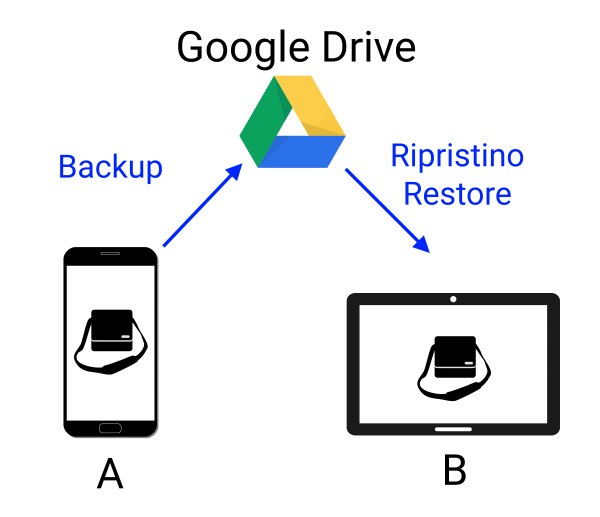
Anyway there is the automatic data backup on Google Drive.
If you enable auto-backup on the device "A" and you press on "Restore" on the device "B", the data of the device "B" will be automatically updated.
This procedure should be enough to cover the 90% of the cases (for example if you use Service Management on your smartphone, but occasionally you need to view data on your tablet).
If you want to modify data from both devices, you have to manually execute the backup and restore from both devices.
What is privacy mode?
Privacy mode is meant to disable the app features which enable to gather personal info.
This mode will not delete any data of the app.
It is possible to enable/disable it from the app settings.
This mode will not delete any data of the app.
It is possible to enable/disable it from the app settings.
No question found. Try with other words or contact the developer.